Chitram Europe Blog
Learn how to watch Indian TV in Europe with step-by-step IPTV guides, channel lists,
device setups, and live sports streaming tips.
Chitram News, Guides & ChitramTV Updates
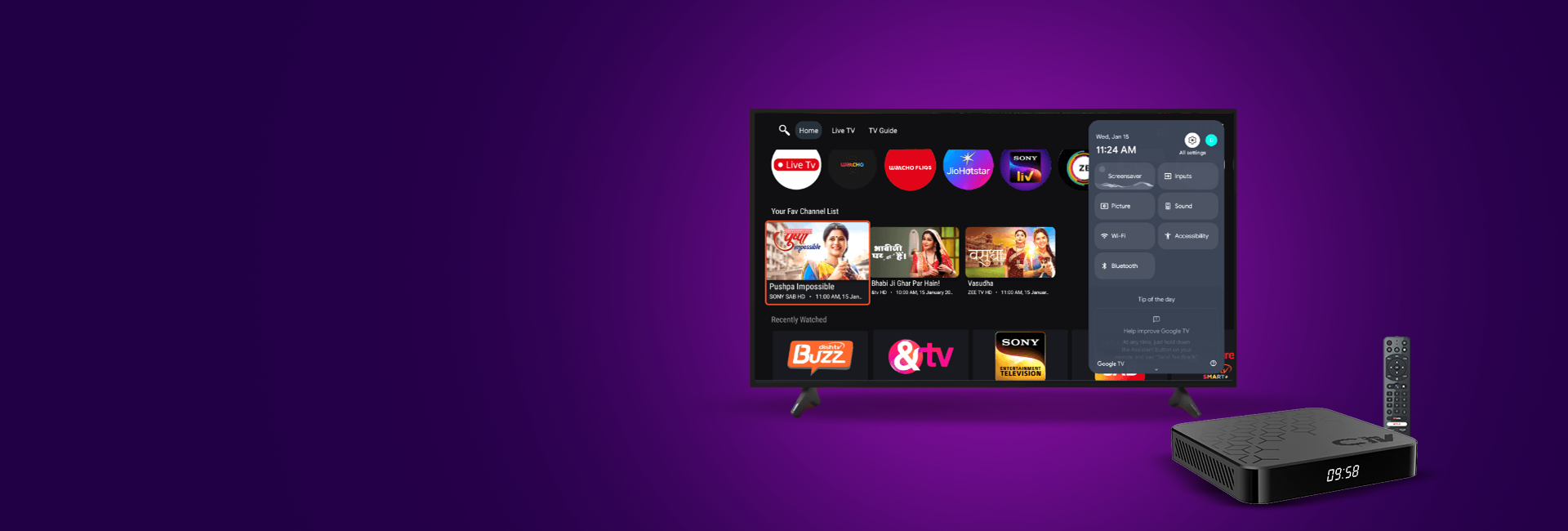
Settling into life in Germany often means finding your own way to stay connected to home, and for many Indian families, that starts with the television. Once you decide to skip the satellite dish, the search usually narrows down to two choices: a physical ChitramTV Set Top Box Germany or an app installed straight onto your television.
Both routes give you access to the same Tamil, Hindi, Malayalam, and Telugu programming, but they work in different ways. The right pick depends on the TV you already own, how you like to watch, and how much setup you want to handle yourself. This guide walks through both paths so you can decide with confidence.
What a Smart TV App Gives You
An Indian TV App for Smart TV Europe is the simplest route if your television already runs Android TV, or if you use a Fire TV Stick, Chromecast, or a similar streaming device. You download the app, log in with your subscription details, and start watching.
Why families choose the app route:
- No extra hardware to unbox or plug in
- No additional remote to learn
- Works on a tablet or phone in another room while the living room TV stays on a different channel
- Nothing to carry if you move apartments
The one thing to keep in mind: app performance depends on your TV’s own processor and how well it handles background apps, which can vary between older and newer Smart TV models.
What a Set-Top Box Adds to the Picture
A dedicated ChitramTV Box is built specifically to run the service, so you are not relying on your television’s general-purpose hardware. This matters more as TVs age. A five or six-year-old Smart TV that struggles to keep apps running quickly can usually handle a modern box without slowdown, because the box does the heavy processing itself and simply sends the picture to your screen through HDMI.
What you get with a set-top box:
- A dedicated remote made for the service
- A stable interface that does not change when your TV’s software updates
- Independent performance, regardless of how old or new your TV is
- Simple setup: connect to power and HDMI, then activate
For households where grandparents or younger children are doing the channel switching, that consistency often makes daily use easier.
Comparing the Two for Everyday Use
Neither option is better in every situation, so it helps to think about how your household actually watches TV, day to day, across different rooms and family members.
| Situation | Better Fit |
| You already own a newer Smart TV or Android TV box | Smart TV app |
| Your TV is a few years old or has a weaker processor | Set-top box |
| You want to skip buying extra hardware | Smart TV app |
| You want one remote that never changes with updates | Set-top box |
| You have more than one TV in the house | A mix of both |
Since a ChitramTV Set Top Box Germany subscription and the app draw from the same account structure, switching between them or running both at once is not complicated.
Making the Choice That Fits Your Home
There is no universal right answer, since every household watches TV a little differently based on habits, the number of screens, and who is using the remote.
A few honest questions can settle this quickly:
- How old is your current TV, and has it handled other streaming apps well?
- Do you want one remote that stays the same regardless of software updates, or are you comfortable navigating your TV’s own menus?
- Is portability important, such as moving between rooms or relocating within Germany?
There is no wrong answer here. Some households value the simplicity of skipping extra hardware, while others prefer the reliability of a device built for one purpose. Both paths lead to the same channels, the same catch-up window, and the same picture quality, so this decision comes down to comfort rather than compromise.
Final Thoughts
Choosing between an app and a physical box is really about matching the setup to your home rather than picking a technically superior option, since both deliver the same channels and features. ChitramTV supports both routes with the same subscription, so you can start with whichever suits your current television and adjust later if your needs change.
Whether you land on a ChitramTV Set Top Box Germany or the app version, the goal stays the same: dependable access to Indian television without satellite dishes or long-term contracts.
Frequently Asked Questions
1. Can I use ChitramTV on a Smart TV without buying a box?
Yes. If your Smart TV supports Android TV or a similar app store, you can install the app directly and log in with your existing subscription, no extra device required.
2. Does a set-top box work better than a TV app?
It depends on your TV’s age and processing power. A box handles its own processing, which often gives steadier performance on older television models.
3. Can I switch from the app to a set-top box later?
Yes. Both options run on the same subscription, so you can move between them or use both at once without buying a new plan.
4. Is a ChitramTV subscription required for both the app and the box?
Yes, both methods need an active subscription. The device you choose only changes how you access the channels, not what you are paying for.
5. Which option is easier to set up for older family members?
A set-top box with a dedicated remote is usually easier for family members who are less comfortable navigating Smart TV menus and app interfaces.
Ready to Start Watching?
Whether you prefer the app or a dedicated box, getting set up takes just a few minutes. Visit chitramiptv.com to choose a subscription plan and get help picking the option that fits your TV and household.
For Indian families settled in Germany or the Netherlands, ChitramTV has become the easiest way to keep Tamil, Hindi, Malayalam, and Telugu channels playing at home. But once your first year winds down, or once you’re weighing whether to sign up in the first place, one question comes up again and again: is it cheaper or simpler to start a new subscription or to renew an existing one?
The two aren’t priced the same way, and knowing the difference can save you from paying for hardware you don’t need or missing a renewal discount you do. This guide breaks down the real costs so you can decide with confidence.
What a New ChitramTV Subscription Includes
A new ChitramTV subscription is built for households in ChitramTV Germany who don’t already own a box. Since you’re starting from scratch, the cost covers both the hardware and the first stretch of service together.
What’s typically bundled into a new subscription:
- A ChitramTV set-top box (remote, power adaptor, and HDMI cable included)
- The first 12 months of service, often bundled at a discount versus buying the box and service separately
- Access to the full channel library from day one, with no separate activation fee
Because the box comes with 12 months of service by default, a new subscription is really a one-time setup cost that then rolls into the same renewal cycle as everyone else.
What a ChitramTV Renewal Covers
A renewal, whether it’s a Chitramtv Subscription Renewal Netherlands order or one placed from Germany, is for existing subscribers who already have a working box and simply need to extend their service before it lapses. Since there’s no hardware involved, renewals are priced purely on how many months of service you’re adding back.
What a renewal typically includes:
- Continued access to your existing channel lineup, with no change in device or setup
- Flexible durations, from short top-ups (as little as one month) to longer annual plans
- A recurring bonus on longer plans, such as extra free months added to a 12-month renewal
- No reactivation delay if you renew before your current plan expires
Because you’re not paying for a box again, renewals are consistently the cheaper of the two options month for month.
Comparing the Costs for Everyday Budgeting
Here’s how the two paths typically stack up, based on current ChitramTV pricing across both the Germany and Netherlands stores (both run on the same Europe-wide pricing structure, so costs are effectively the same in either country):
| Package | What You Get | Price |
| Device + 12 Months of Services | Full new subscription: ChitramTV box plus first year of service | €129 |
| 12+2 Free Months of Services (Other Devices) | 14 months of service for Firestick, Android TV, and similar streaming devices | €109 |
| 12+2 Free Months of Services | 14 months of service renewal for your existing ChitramTV box | €109 |
| 6 Months Services (Other Devices) | 6-month service renewal for Firestick, Android TV, and similar streaming devices | €74 |
| 6 Months Services | 6-month service renewal for your existing ChitramTV box | €74 |
| Device Only | Box hardware only, for existing subscribers adding a second device | €55 |
| Remote D | Replacement remote, compatible with media player devices | €9.99 |
| Remote M | Replacement remote, compatible with media player devices | €9.99 |
A few things worth noting when you’re budgeting:
- The 12+2 renewal works out cheaper per month than the 6-month plan, so if you know you’re staying with ChitramTV, it stretches your money furthest.
- If you already own a box from a previous plan, there’s no reason to pay for a new one; a straight service renewal (6-month or 12+2) is the lower-cost route.
- If you’re moving from a different provider or setting up ChitramTV for the first time, the Device + 12 Months bundle works out to be better value than buying a box and a short service plan separately.
- Service renewals come in two versions at the same price: one for your existing ChitramTV box, and one for Firestick, Android TV, and other personal devices. Make sure you pick the one that matches your setup.
Making the Choice That Fits Your Budget
Whichever way your household leans, the ChitramTV Subscription / Renewal decision usually comes down to a couple of honest questions:
- Do you already have a working ChitramTV box, or are you starting fresh?
- Is your current plan about to expire, or has it already lapsed?
- Would you rather pay a bit more up front for a longer plan, or keep costs low with shorter, more frequent renewals?
If you already own the hardware, renewing is almost always the more cost-effective choice. If you’re new to ChitramTV or need a second box for another room, the bundled new-subscription pricing tends to work out better than buying the pieces separately.
Final Thoughts
The choice between a new ChitramTV subscription and a renewal isn’t really about which is “better.” It comes down to whether you already have the hardware. If your box is still working, renewing is almost always the smarter financial move, since you’re only paying for months of service rather than a device you don’t need again. If you’re setting up ChitramTV for the first time or adding a box to a second room, the bundled Device + 12 Months plan gives you a cleaner starting price than buying the pieces separately.
Existing subscribers save by renewing, while new households get more value from the bundle. Either way, the channels, picture quality, and features stay identical across Germany and the Netherlands, so the only real decision left is which cost structure fits your household’s current situation.
Frequently Asked Questions
1. Is a ChitramTV renewal cheaper than a new subscription?
Yes. Since a renewal only covers service and not hardware, it’s consistently less expensive per month than a new subscription that includes a box.
2. Do renewal prices differ between Germany and the Netherlands?
No. ChitramTV runs the same Europe-wide pricing across both markets, so renewal and subscription costs are effectively identical in either country.
3. What happens if I let my ChitramTV subscription expire before renewing?
You’ll lose access to live channels until you renew, though your box and account remain linked, so a renewal reactivates service without needing a new setup.
4. Can I renew for a shorter period if I don’t want to commit to a full year?
Yes. ChitramTV offers shorter renewal options alongside the annual plans, though the per-month cost is higher than committing to a longer renewal.
5. Do I need a new box every time I renew?
No. The box is a one-time purchase. Renewals only add service months to the box you already own.
Ready to Subscribe or Renew?
Setting up a ChitramTV Subscription Germany plan or renewing your existing one takes just a few minutes.
Visit chitramiptv.com to compare current pricing for Germany and the Netherlands. Pick the option that fits your household.
Missing live cricket because of time zones or no satellite access is one of the most common frustrations for Indian and Tamil sports fans in Europe. Here’s how a ChitramTV subscription solves that and how to make sure you never miss a match.
Why Cricket Fans in Europe Struggle Without IPTV
Traditional satellite and cable packages rarely include full Indian sports coverage in Europe, and even when they do, time zone differences mean missing live play during work or sleeping hours. ChitramTV solves both problems at once: full sports channel access, plus flexibility to watch on your own schedule.
What Sports Content Is Available on ChitramTV
A ChitramTV subscription includes live access to international sports, with cricket as the standout draw for Indian and Tamil viewers across Europe – international tours, major tournaments, and more, all included in your existing subscription. No separate sports package, no extra add-on fee. If it’s international sport, it’s covered.
Watching Cricket Live vs. Catching Up Later
ChitramTV supports both real-time viewing and catch-up access, so if a match airs while you’re asleep or at work across a European time zone, you’re not out of luck. Catch-up access lets you watch missed coverage after the fact, on your own schedule.
Best Devices for Watching Live Sports on ChitramTV
For the smoothest live international sports experience, a stable connection matters more than for on-demand content. ChitramTV works well for live cricket and international sports streaming on:
- Smart TV or Android TV (no buffering lag on a wired or strong Wi-Fi connection)
- ChitramTV Set-Top-Box, built for consistent live streaming
- Firestick or mobile, for watching
Watching ChitramTV on the big screen doesn’t require a separate Set-Top-Box if your TV already supports Android. Here’s exactly how to get your ChitramTV subscription running on Smart TV and Android TV, step by step.
Which TVs Work with ChitramTV
ChitramTV runs on any Android-based Smart TV, including popular brands like Sony, TCL, and Mi. If your TV has access to the Google Play Store, it’s almost certainly compatible — no ChitramTV Set-Top-Box required for these devices.
Setting Up ChitramTV on Your Smart TV
- Confirm your TV runs Android TV OS — check your TV’s settings menu or look for the Google Play Store icon on the home screen.
- Open the Google Play Store and search for the ChitramTV app.
- Install the app directly onto your TV.
- Open the app and enter your PIN — the same PIN issued with your ChitramTV subscription or renewal activates the app instantly.
- Start streaming — Tamil, Hindi, Malayalam, and other Indian channels load immediately once activated.
What If Your TV Isn’t Android-Based?
Not every Smart TV runs Android — many Samsung and LG models use their own operating systems instead. If your TV doesn’t support the Play Store, you have two options:
- Use a ChitramTV Set-Top-Box, which connects via HDMI and works regardless of your TV brand.
- Stream through a Firestick or Android TV stick connected to any HDMI port.
Why Smart TV Streaming Works Well for ChitramTV
Smart TV streaming means no extra remote, no extra box cluttering your TV stand, and one less device to manage. For viewers across Europe who already own an Android-based TV, it’s the simplest way to get every ChitramTV channel without buying additional hardware.
Get Started on Your Smart TV
Already have your PIN? Open the app and start watching. Don’t have a ChitramTV subscription yet? Subscribe now and get streaming on your Smart TV today.
How to Renew Your ChitramTV Subscription (2026 Guide)
If your ChitramTV subscription is about to expire, renewing is simple – and avoiding a lapse means you keep watching your favourite Tamil, Hindi, and Malayalam channels without any interruption. Here’s exactly how renewal works, what to expect, and how to avoid common mistakes that cause unnecessary downtime.
Why Renew Your ChitramTV Subscription on Time
Letting your Chitram TV subscription lapse means losing access to live channels, catch-up TV, and on-demand content until you renew. For viewers across Europe relying on ChitramTV for daily Tamil and Hindi programming, even a short gap can mean missing live sports, serials, or news. Renewing a few days before expiry avoids this entirely.
How ChitramTV Subscription Renewal Works
- Check your expiry date – this is shown in your account or app under subscription details.
- Visit the renewal page and select your plan length – monthly, 6-month, or annual ChitramTV subscription options are available.
- Choose your payment method and complete checkout.
- Receive your new PIN – every ChitramTV subscription renewal generates a fresh PIN, sent to you once your order is confirmed. You don’t need your old subscription ID – just enter the new PIN on your device, app, or software to activate the renewed period.
Renewing on Different Devices
Whether you watch ChitramTV on a Smart TV, Firestick, mobile, or PC, renewal applies across your account – not per device. Once renewed, every device linked to your ChitramTV subscription continues working without separate setup.
Common Renewal Mistakes to Avoid
- Waiting until the last day – payment and PIN delivery take a little time, so renew a few days before expiry, not on it.
- Using an old payment method that’s expired – update your card details before renewal day, not after.
- Entering the old PIN by mistake – your renewal only activates once you input the new PIN you receive after payment; reusing the old one won’t extend your access.
Tamil audiences in Europe often struggle to access their favorite channels due to regional restrictions.
Popular Tamil Channels
- Sun TV
- Vijay TV
- Zee Tamil
Challenges in Europe
- Geo-blocking
- Limited OTT availability
Best Solution: IPTV
IPTV offers full Tamil channel access without restrictions.
For full setup, check IPTV Firestick Europe guide.
Why IPTV is Ideal for Tamil Viewers
- No location restriction
- All channels in one place
- Works on all devices
Best IPTV Service for Tamil Channels
Services like Chitram IPTV provide complete Tamil channel coverage along with other Indian content.
Explore full options in our Best Indian IPTV Europe guide.
Final Thoughts
For Tamil viewers in Europe, IPTV is the most reliable and complete solution.
FAQ
Can I watch Tamil TV in Europe?
Yes, IPTV provides full access.
Do I need a VPN?
Usually not required with a good IPTV provider.
Watch Tamil TV Home anywhere in Europe with Chitram IPTV Buy now
Top Indian Channels You Can Watch in Europe (Hindi, Tamil & More)
Indian audiences in Europe often struggle to access regional channels.
Hindi Channels
- Star Plus
- Sony TV
- Zee TV
Tamil Channels
- Sun TV
- Vijay TV
Want full Tamil access? See best Tamil channels in Europe guide.
Malayalam Channels
- Asianet
- Surya TV
Telugu Channels
- Gemini TV
- ETV
Where to Watch These Channels
Most of these channels are not fully available through traditional European providers.
The best option is IPTV. Learn more in our Best Indian IPTV Europe guide.
Final Thoughts
Instead of juggling multiple platforms, IPTV gives you everything in one place.
FAQ
Can I watch Indian channels in Europe?
Yes, using IPTV services.
Are regional channels available?
Yes, including Tamil, Telugu, Malayalam.
Get access to all Indian channels Home in Europe with one subscription Buy now
IPTV on Firestick in Europe – Complete Setup Guide (2026)
Firestick is one of the easiest devices to stream Indian IPTV in Europe.
What You Need
- Amazon Firestick
- IPTV subscription
- Internet connection
Step-by-Step Setup
- Install IPTV app (IPTV Smarters / TiviMate)
- Enter login details
- Start streaming
Best IPTV Apps
- IPTV Smarters
- TiviMate
Common Issues
- Buffering → internet speed
- Login errors → wrong credentials
Best IPTV Service for Firestick
A reliable service like Chitram IPTV ensures smooth streaming and full channel access.
New here? Read how to watch Indian TV in Europe without cable.
Final Thoughts
Firestick + IPTV is the simplest way to access Indian TV channels in Europe.
FAQ
Can I install IPTV on Firestick easily?
Yes, it takes only a few minutes.
Is Firestick good for IPTV?
Yes, it’s one of the most popular devices.
Set up Chitram IPTV on your Firestick in minutes Buy now
Watching Indian TV in Europe used to require satellite setups or expensive cable subscriptions. Today, there are smarter and easier ways to access your favorite content.
Problems with Traditional TV Options
- Limited Indian channels
- High cost
- Complex installation
Modern Ways to Watch Indian TV in Europe
1. OTT Apps
Limited content and region restrictions.
2. Satellite TV
Expensive and outdated.
3. IPTV (Best Option)
Flexible, affordable, and complete.
For the best providers, check our Best Indian IPTV Europe guide.
Why IPTV is the Best Choice
- No dish or cable required
- Works anywhere in Europe
- Access to 250+ Indian channels
How to Get Started
- Choose IPTV provider
- Install IPTV app
- Enter subscription details
Need help? See our IPTV Firestick setup guide in Europe.
Final Thoughts
IPTV has completely changed how Indian audiences in Europe watch TV. It removes all the limitations of traditional services.
Start watching instantly with a reliable IPTV service.
FAQ
Can I watch Indian TV without cable in Europe?
Yes, IPTV allows streaming over internet.
Do I need fast internet?
A stable connection is enough for HD streaming.
Watch your favorite Indian channels Home in Europe instantly with Chitram IPTV Buy now
Chitram TV Blog – IPTV Streaming Guides for Indian & Tamil Viewers in Europe
Chitram TV is an IPTV streaming service built for Indian and Tamil audiences across Europe. This blog shares practical guides, setup tutorials, and subscription tips to help you get the most out of your ChitramTV subscription.
Setup Guides: Firestick · Smart TV & Android TV
Channels & Content: Top Indian Channels in Europe · Best Tamil Channels 2026
Subscription Help: Renewal Guide · Buffering or Freezing? How to Fix It
Sports & Live TV: Live Cricket & International Sports on ChitramTV
Ready to Watch Chitram TV in Europe?
No cable. No dish. No restrictions.